.svg)




Key Takeaways

- A cloud-native TMS delivers continuous updates, fast implementation, and no version lag — cloud-hosted legacy software does not
- Carrier connectivity, RFP automation, and AI features should be demonstrable in production today, not promised on a roadmap
- True centralization covers the full freight lifecycle: ordering, tracking, settlements, dock scheduling, and reporting in one platform
Nearly half of freight professionals switch between five or more platforms to complete a single workflow. And according to that same 2026 Deep Current survey, it gets even more manual: more than half re-enter the same shipment data across multiple systems.
The Transportation Management System (TMS) market has caught up to the problem. Cloud-native platforms now handle visibility, ordering, settlements, and AI-assisted freight operations in a single workspace. The challenge isn't finding options — it's knowing what separates platforms that deliver from ones that look good in a demo.
This guide walks through the five criteria that matter most when evaluating a SaaS-based TMS in 2026.
Why is real-time visibility important in a TMS platform?
Knowing where your freight is isn't enough. The platforms worth evaluating tell you what changed, why it changed, and what to do about it.
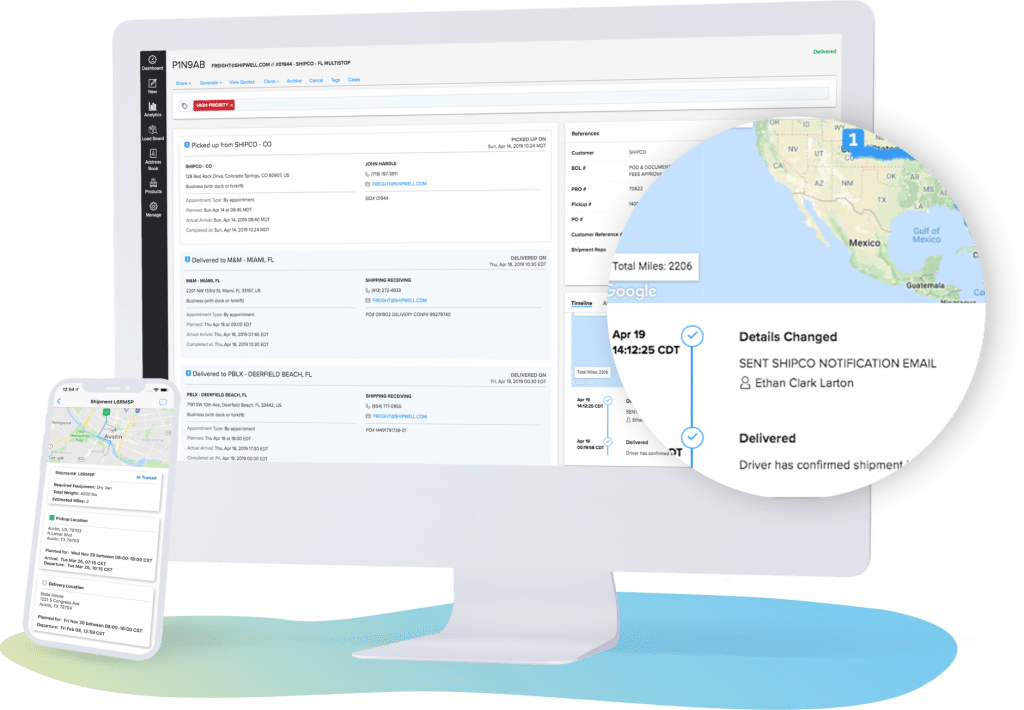
Look for multimodal tracking across TL, LTL, intermodal, and parcel — not just one or two modes. ELD integrations with providers like Samsara mean location updates happen automatically, without a single check-call. AI-assisted Track and Trace workers proactively surface exceptions before they become service failures.
Shipwell gives real-time visibility across every mode in your network. AI workers monitor shipments and flag exceptions. No manual oversight needed.
How easy is implementation?
Months of implementation is a legacy TMS problem, not a cloud one — if the platform is genuinely cloud-native.
Shipwell is hosted entirely in the cloud, which means no on-premise setup or IT infrastructure requirements. New capabilities ship every two to three weeks, with no version lag. Your team runs on the current version automatically.
What to evaluate before signing:
- REST API-first architecture that connects to your ERP, WMS, and EDI stack without custom middleware
- Native integration with your ERP (like NetSuite or Infor M3), your billing system platform of choice (like QuickBooks) and a growing marketplace of carrier and technology partners
- Spreadsheet-based onboarding for carrier, product, and contract data
If a vendor quotes six months to go live, that's not a cloud TMS.
Why do direct carrier connections matter?
A platform with direct carrier integrations and a private load board is categorically different from one that requires manual tendering. The gap compounds over time.
Shipwell connects shippers, carriers, and 3PLs in one network, with:
- Direct carrier integrations through the Carrier Connections program, including asset-based and regional providers
- RFP Automation to build bids, award lanes, and route freight without spreadsheet management
- Zone-based contract management with automated fuel surcharge calculations, including real-time FSC data from integrations like Breakthrough Fuel

The right platform doesn't just connect your existing carriers — it gives you tools to negotiate, optimize, and automate with them.
What does data centralization mean for freight management?
A modern TMS should close the loop on the full freight lifecycle:
- Order management with automatic sync to shipments and outbound workflows
- Dock scheduling to coordinate appointments without phone calls
- Settlements with automated invoice matching and unmatched invoice resolution built in
- Load optimization to consolidate LTL freight into more cost-effective truckload moves
- Advanced reporting with configurable dashboards and data export
Shipwell's Groups feature lets enterprise shippers organize shipments, orders, and settlements by business unit, region, or customer, all inside one platform.
How can I tell what AI features will help my organization?
Every TMS vendor is talking about AI. Few have built it into the actual workflow. Ask vendors to show you AI that runs today, not features in a future release.
Shipwell's AI capabilities are in production across active customer accounts:
- In-App AI Assistant: Swifty, the default name of our in-platform AI assistant, that handles order planning, answers freight questions, and connects to Slack or Microsoft Teams
- Track & Trace AI Worker: autonomously monitors every shipment, flags exceptions, and coordinates with carriers to resolve issues before they become real problems
- AI Studio: a configurable workspace to monitor AI worker activity and enable new capabilities as they release
- MCP Server: gives AI tools secure, real-time access to your freight data as a native data source
Ask your shortlisted vendors to demo their AI capabilities in a sandbox environment. Better yet, ask to test them yourself. If they can't comply, you're evaluating a roadmap, not a product.
Your SaaS-Based TMS Checklist
Before you select your next TMS, consider the following:
- Require multimodal visibility with ELD and EDI integrations and AI exception monitoring
- Verify cloud-native status by confirming continuous platform updates with no implementation lag
- Ensure any carrier connectivity and RFP tooling is scalable with your business needs over time
- Define “centralized data” beyond shipment tracking
- Get a demo of any AI features in a live environment, not promised in a future release
Frequently Asked Questions
What's the difference between a cloud-based TMS and a cloud-hosted TMS?
A cloud-native TMS is built from the ground up to run in the cloud — updates deploy automatically, infrastructure scales on demand, and users always run the current version. A cloud-hosted TMS is legacy software moved onto a cloud server, which means it can still require manual upgrades and carry the same implementation overhead as on-premise systems.
How long does TMS implementation typically take?
A cloud-native TMS with pre-built integrations and spreadsheet-based data import can be operational in weeks, not months. Implementations that take six months or longer typically involve legacy architectures, heavy customization, or on-premise components.
What integrations should a TMS have out of the box?
At minimum: ELD providers for automated location updates, an ERP connector, EDI capability for carrier tendering, and a freight marketplace or load board. Advanced platforms also include dock scheduling software, fuel management integrations, and a public API for custom connections.
How do I evaluate AI features in a TMS platform?
Ask vendors to demo AI features in a live production environment — not a staging sandbox. Specifically look for: an in-platform AI assistant with documented use cases, document processing automation, and AI worker tools that operate on real shipment data. If a vendor can only describe AI capabilities instead of showing them, treat those as future roadmap items.